Quick Start Guide
In this Quick Start guide we'll wire the SparkFun Formaldehyde Sensor - SFA40 (Qwiic) into a Qwiic circuit with a RedBoard IoT - RP2350 to get formaldehyde readings from the sensor in just a few short minutes. This guide assumes users have a working knowledge of the Qwiic ecosystem, Arduino IDE and using Arduino libraries. If you're not familiar with those topics or want to learn more about the SFA40, we recommend reading through the other sections of the Hookup Guide.
Basic Assembly
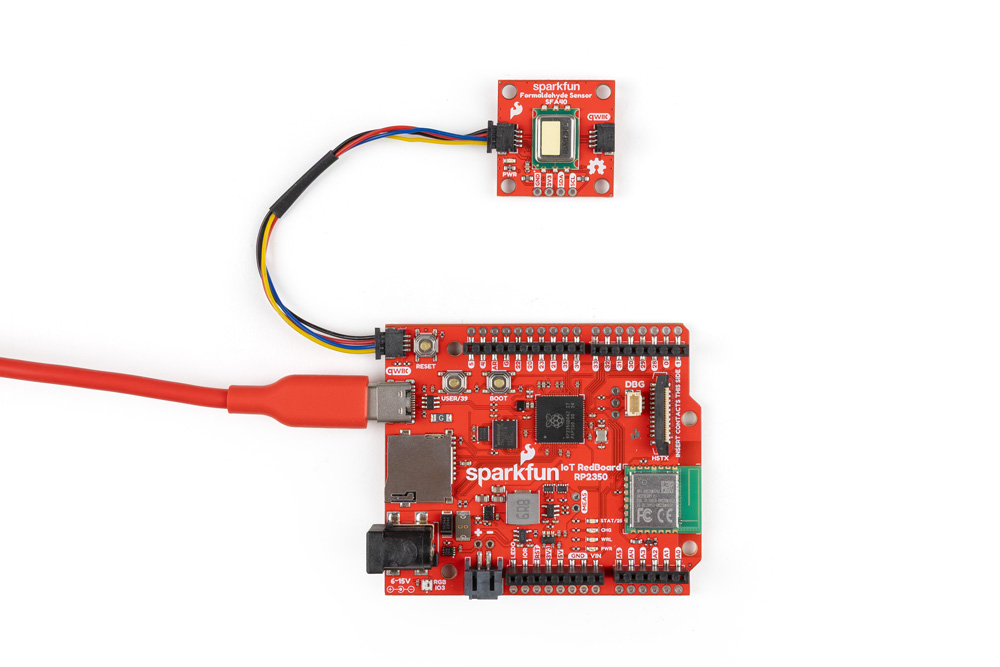
Since this is a Qwiic breakout, all we need to do is connect it to the RedBoard using a Qwiic cable and then plug the RedBoard into a computer over USB:
Arduino Example
With everything wired up, let's use the fourth example in the SFA40 Arduino Library, Sensor Status, to show how the SFA40 performs during initial power up. The SFA40 needs to warm up after power-on. For the first minute the sensor is not ready and the formaldehyde output is forced to 0. Between roughly 1 and 10 minutes the sensor is ready but not yet within specifications. After about 10 minutes the formaldehyde reading is within specifications. This example prints out sensor data along with the sensor status to let you know what state the sensor is in.
- Open the Arduino IDE
- Install the SparkFun SFA40 Arduino library by searching for "SparkFun SFA40" in the Libraray Manager tool. Note, this library requires the SparkFun Toolkit to be installed as well. Install that library by searching for "SparkFun Toolkit" in the Library Manager.
- Open "Example04-SensorStatus" from the SFA40 library. Select your Board and Port and click the "Upload" button.
- After the code finishes uploading, open the serial monitor with the baud set to 15200.
- This example initializes the SFA40 on the I2C bus and then performs a soft reset to simulate a power cycle. After resetting, the code reads the status report from the SFA40 and prints out "Sensor warming up (not ready)" during the first minute, then prints out "Stabilizing (HCHO ~) ppb, not yet within spec" for the stabilization period. Once the stabilization completes, it prints out stabilized HCHO readings along with temperature and relative humidity.